Amazon Product Video Guidelines: Structured Content QA Template
Learn how to validate product data, claims, asset rights, and video files with a practical JSON Schema QA template.
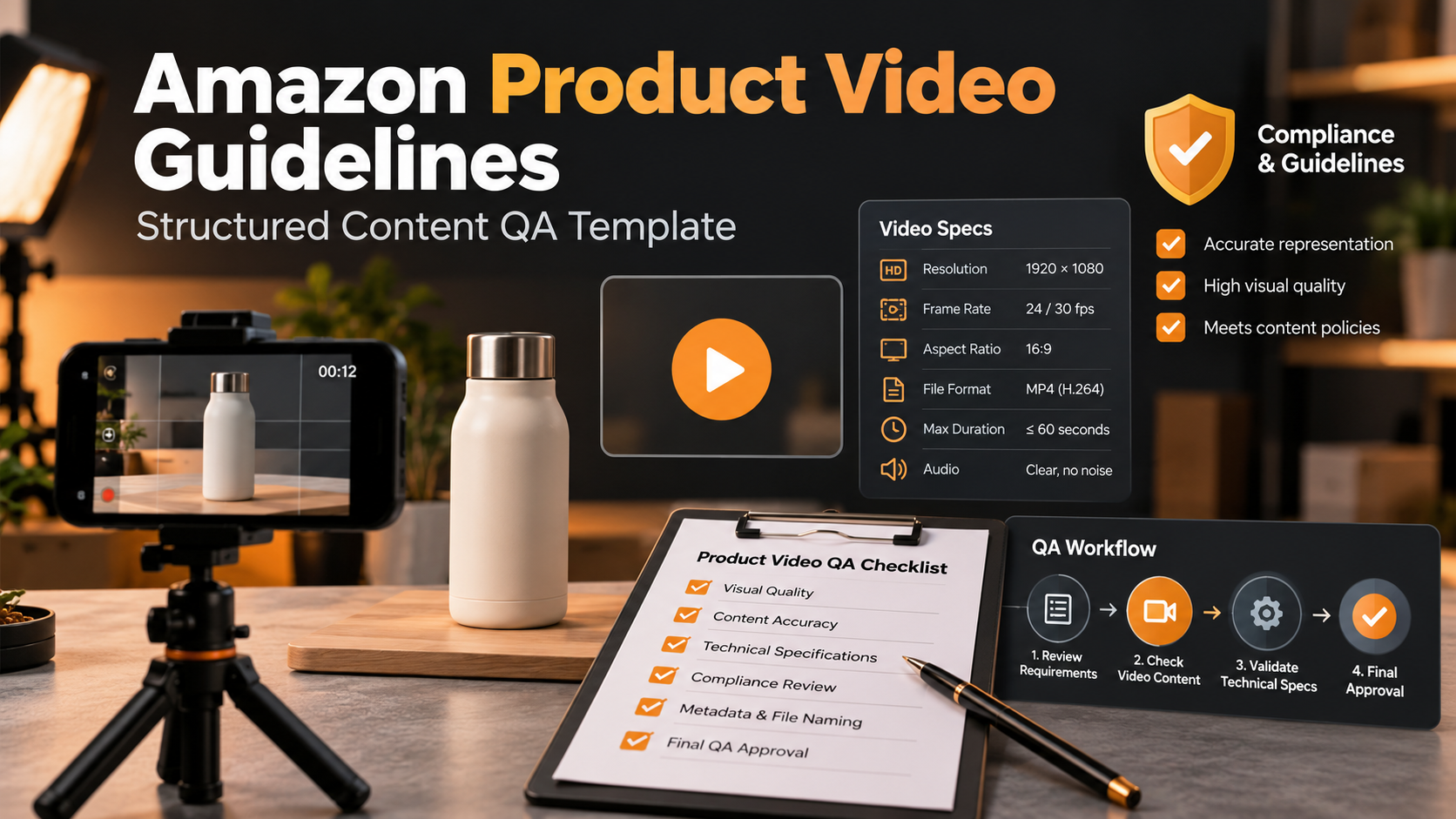
Uploading a product video is not only a creative task. It also requires accurate product data, valid media files, and a final quality check.
A video can look professional and still contain the wrong SKU, an outdated product claim, or an asset that the brand cannot legally use.
That is why Amazon product video guidelines should be part of a structured review process.
This guide shows how to create a JSON-based quality assurance (QA) template for Amazon product videos. It covers SKU information, product claims, asset sources, video duration, and file formats.
It also includes a practical JSON Schema example for checking content before upload.
1. Why Structured QA Matters
A structured QA process helps teams catch errors before a video goes live.
Instead of relying only on a manual checklist, teams can store important video details in a consistent format.
For example, a video record might include:
- The product SKU and ASIN
- Verified product claims
- The source of each video asset
- Video duration and file format
- Copyright and usage permissions
- Final review status
These fields can be checked by software or reviewed by a team member.
JSON Schema is useful here because it defines what data a JSON document should contain.
It can check field types, required values, and simple rules.
However, a valid JSON file does not prove that every product claim is true. Human review is still needed.
2. Validate SKU and Product Information
Start with the correct product record.
The SKU is the seller's own product identifier. The ASIN identifies a product within Amazon's catalog.
These values help connect the video to the intended product.
A basic QA record should contain:
| Field | Purpose |
|---|---|
sku |
Identifies the seller's product |
asin |
Identifies the Amazon catalog item |
productName |
Stores the approved product name |
marketplace |
Records the intended Amazon marketplace |
variation |
Records the product version, if relevant |
An ASIN usually contains 10 letters or numbers. This format can be checked with a pattern rule.
Still, a matching pattern does not prove that the ASIN exists or belongs to the correct product.
That requires a separate catalog check.
3. Check Product Claims Before Publishing
Product videos often include claims about size, material, features, or performance.
Each claim should match an approved source.
For example, a video may say that a desk lamp has three brightness modes.
The QA record should point to evidence for that statement.
Useful claim fields include:
text: The exact claim used in the videoevidenceReference: A source or internal record supporting itapproved: Whether the claim passed review
Do not approve a claim simply because it sounds reasonable.
Also check captions, graphics, and voiceovers. A misleading claim can appear in any of these places.
4. Track Video Assets and Usage Rights
A product video may use several types of assets.
These include product footage, stock clips, music, voiceovers, images, and graphics.
Each asset needs a source record.
A useful record should answer:
- Where did the asset come from?
- Who owns it?
- Is commercial use allowed?
- Can the brand use it in the planned marketplace?
- Is there a license or approval record?
For example, a music file may be allowed in an organic social media post but not in a paid advertisement.
Do not assume that one license covers every use.
A structured QA template can require an evidence reference before an asset is marked as approved.
5. Validate Video Duration and File Format
Video rules can change by marketplace and placement.
Amazon's US shoppable video documentation lists MOV and MP4 as accepted video formats.
Its published technical specifications include a maximum file size of 5 GB, resolution up to 1080p, and a duration range of 1–12 minutes for the documented shoppable-video category.
These are not universal settings for every Amazon video or ad format.
Always check the rules for the destination before upload.
A QA template can store:
| Field | Example | Purpose |
|---|---|---|
fileFormat |
mp4 |
Checks the file type |
durationSeconds |
90 |
Records video length |
width |
1920 |
Records frame width |
height |
1080 |
Records frame height |
fileSizeBytes |
25000000 |
Records file size |
The values above are sample data, not required settings for every upload.
6. A Practical JSON Schema for Product Video QA
The following JSON Schema uses Draft 2020-12.
It defines a small internal QA record with required product data, approved claims, rights records, and basic media constraints.
The example uses technical limits from Amazon's documented US shoppable-video requirements. Adjust these limits for other marketplaces and placements.
JSON Schema example:
{
  "$schema": "https://json-schema.org/draft/2020-12/schema",
  "title": "Product Video QA Record",
  "type": "object",
  "additionalProperties": false,
  "required": [
    "product",
    "claims",
    "assets",
    "video"
  ],
  "properties": {
    "product": {
      "type": "object",
      "additionalProperties": false,
      "required": [
        "sku",
        "asin",
        "productName",
        "marketplace"
      ],
      "properties": {
        "sku": {
          "type": "string",
          "minLength": 1
        },
        "asin": {
          "type": "string",
          "pattern": "^[A-Z0-9]{10}$"
        },
        "productName": {
          "type": "string",
          "minLength": 1
        },
        "marketplace": {
          "type": "string",
          "minLength": 1
        },
        "variation": {
          "type": "string"
        }
      }
    },
    "claims": {
      "type": "array",
      "items": {
        "type": "object",
        "additionalProperties": false,
        "required": [
          "text",
          "evidenceReference",
          "approved"
        ],
        "properties": {
          "text": {
            "type": "string",
            "minLength": 1
          },
          "evidenceReference": {
            "type": "string",
            "minLength": 1
          },
          "approved": {
            "const": true
          }
        }
      }
    },
    "assets": {
      "type": "array",
      "minItems": 1,
      "items": {
        "type": "object",
        "additionalProperties": false,
        "required": [
          "source",
          "rightsReference",
          "commercialUseApproved"
        ],
        "properties": {
          "source": {
            "type": "string",
            "minLength": 1
          },
          "rightsReference": {
            "type": "string",
            "minLength": 1
          },
          "commercialUseApproved": {
            "const": true
          }
        }
      }
    },
    "video": {
      "type": "object",
      "additionalProperties": false,
      "required": [
        "fileFormat",
        "durationSeconds",
        "width",
        "height",
        "fileSizeBytes"
      ],
      "properties": {
        "fileFormat": {
          "enum": ["mp4", "mov"]
        },
        "durationSeconds": {
          "type": "integer",
          "minimum": 60,
          "maximum": 720
        },
        "width": {
          "type": "integer",
          "minimum": 1
        },
        "height": {
          "type": "integer",
          "minimum": 1
        },
        "fileSizeBytes": {
          "type": "integer",
          "minimum": 1,
          "maximum": 5000000000
        }
      }
    }
  }
}
This schema checks the structure of the QA record.
It does not inspect the actual video file, verify ownership, or confirm that an ASIN is active.
The width and height fields are recorded for later media checks. This schema does not enforce a specific aspect ratio or resolution.
It also requires all listed claims and assets to be marked as approved. A real workflow should preserve rejected items in a separate review record.
7. Example JSON Record
The next example uses a fictional product.
Its values are for testing the data structure only. They do not describe a real Amazon listing or prove that any product feature exists.
{
  "product": {
    "sku": "DEMO-LAMP-01",
    "asin": "B0TEST1234",
    "productName": "Sample Desk Lamp",
    "marketplace": "US",
    "variation": "White"
  },
  "claims": [
    {
      "text": "Three brightness settings",
      "evidenceReference": "demo-spec-sheet-v1",
      "approved": true
    }
  ],
  "assets": [
    {
      "source": "internal-demo-footage",
      "rightsReference": "demo-rights-record",
      "commercialUseApproved": true
    }
  ],
  "video": {
    "fileFormat": "mp4",
    "durationSeconds": 90,
    "width": 1920,
    "height": 1080,
    "fileSizeBytes": 25000000
  }
}
This sample should pass the structural checks in the example schema.
The approval flags and evidence references are placeholders for testing. They must never be treated as real proof.
8. Run the Validation
A developer can validate the JSON record with a JSON Schema library.
For example, Python's jsonschema package supports Draft 2020-12.
Basic Python example:
import json
from jsonschema import Draft202012Validator

with open("video-qa-schema.json", encoding="utf-8") as f:
    schema = json.load(f)

with open("video-record.json", encoding="utf-8") as f:
    record = json.load(f)

Draft202012Validator.check_schema(schema)

validator = Draft202012Validator(schema)
errors = sorted(
    validator.iter_errors(record),
    key=lambda error: list(map(str, error.path))
)

if errors:
    for error in errors:
        location = ".".join(map(str, error.path)) or "root"
        print(f"{location}: {error.message}")
else:
    print("Structural QA passed.")
Save the schema as video-qa-schema.json and the sample record as video-record.json.
Install the Python library with:
pip install jsonschema
If you set approved to false, the schema will reject that claim record.
If the video duration falls outside the configured range, the validation will also fail.
A passing result means the record meets the defined data rules. It does not mean Amazon has approved the video.
9. Add Human Review Before Uploading
Automated validation is useful, but it is only one part of a complete QA process.
Before upload, a reviewer should confirm:
- The SKU and ASIN match the intended listing.
- Every product claim has real supporting evidence.
- The product shown matches the selected variation.
- The video file opens and plays correctly.
- The actual codec, resolution, and aspect ratio meet the current placement rules.
- The brand has the necessary rights to every asset.
- The video follows Amazon's content guidelines.
Amazon's shoppable-video guidance also restricts misleading claims, unauthorized content, external website links, and promotional calls to action within the relevant video placement.
For production planning, see this Amazon product video workflow.
You can also review product video ad hooks and testing when preparing creative content for other ad placements.
These resources are additional reading. Always verify current Amazon requirements against official documentation.
10. Final Structured QA Checklist
Use this list before submitting a video:
- SKU and ASIN match the product listing.
- Product name and variation are correct.
- Every claim has supporting evidence.
- Rights records are complete.
- File format and duration meet the relevant requirements.
- File size and actual resolution have been checked.
- The JSON record passes schema validation.
- Human product review is complete.
- Copyright and advertising checks are complete.
- The final file has been reviewed before upload.
Final Thoughts
A structured QA process can make product video marketing more reliable.
JSON Schema helps teams check required fields, data types, and simple rules before publishing.
It is not a substitute for fact-checking, media inspection, copyright review, or marketplace approval.
Start with a clear product record, check claims and asset rights, and validate the media file.
A good product video QA process combines automated checks with careful human review.
About the author
- I'm a digital content enthusiast passionate about technology, innovation, and emerging digital trends. I enjoy exploring new ideas, sharing practical insights, and creating informative content that helps readers learn and stay updated in an ever-evolving digital world.
Comments
Join the discussionNo comments yet. Be the first to comment.