Funny AI Video Ideas: Debug Short Animations With a Prompt Log
A practical debugging workflow for AI-generated animations using prompt logs, failure categories, TSV and JSON records, and controlled retesting.
When debugging funny AI video prompts or image-to-video dancing prompts, treat every generated clip as a reproducible experiment rather than a lucky render. A character that changes shape mid-dance, a camera that drifts away from the subject, or a product that looks different between frames is a debugging problem that deserves a traceable fix.
The most useful workflow combines parameter logging, consistent failure categories, and single-variable retesting. Instead of rewriting a long prompt after every disappointing result, record what you generated, identify the defect, and change one relevant instruction at a time.
This approach is useful for developers building video-generation pipelines, creators producing short-form animations, and teams developing repeatable workflows for comedy clips or product advertisements. It cannot eliminate model variability, but it makes experiments easier to compare, review, and reproduce.
Why Rewriting the Whole Prompt Makes Debugging Harder
An AI video prompt can contain several distinct instructions: subject movement, camera behavior, visual style, environmental motion, and timing. When all of them change between generations, an improved result does not reveal which modification helped.
Imagine a hypothetical animation in which a character performs an exaggerated dance beside a product. The first generation has three defects: the character's hand changes shape, the camera drifts sideways, and the product eventually leaves the frame.
Adding more descriptive adjectives does not isolate any of these problems. Instead, separate them into testable categories. Camera drift concerns framing and camera instructions. A changing hand concerns anatomy or temporal consistency. A disappearing product concerns composition and subject visibility.
These defects can interact, and not every problem can be corrected through prompting alone. The goal is to gather enough evidence to decide whether a prompt adjustment, a different reference image, or another generation approach is worth trying.
Runway's official Gen-4 Video Prompting Guide recommends starting with simple prompts and adding elements incrementally. It specifically explains how changing one element at a time helps identify improvements and troubleshoot unexpected results. The principle also provides a useful foundation for debugging workflows built around other video-generation tools.
What to Record for Every Generation
A prompt log should capture enough information to reconstruct the conditions of a generation as closely as the tool allows. Saving only the prompt text leaves out important differences between source images, model versions, and available settings.
Record the model identifier and version, generation mode, source asset ID, exact prompt text, prompt version, aspect ratio, requested duration, and output file or job ID. Capture the seed, resolution, frame rate, and other generation parameters when they are available. If a tool does not expose a setting, record it as unavailable rather than inventing a value.
Preserve negative prompts separately when the model supports them. Prompt behavior can differ between systems: Runway's Gen-4 guide recommends positive phrasing because that model may interpret negative phrasing unpredictably. Do not assume that a negative instruction works identically across generators.
The reference image also deserves attention. Save its filename or asset ID, and consider recording a checksum to distinguish revised files with similar names. A blurry hand or distorted face in the source image may become more noticeable in the generated video, as described in Runway's official Image-to-Video Prompting Guide.
Finally, distinguish requested settings from observed outcomes. A prompt might request a stationary camera, but that does not prove the camera remained still. The exported clip must still be reviewed.
Build a Failure Taxonomy
Consistent labels make debugging easier to automate and compare. Without them, two reviewers might describe the same changing hand as an anatomy problem and a flicker problem, making it harder to find similar failures later.
Use a primary category for the main defect and add a secondary category when necessary.
| Failure category | What to inspect |
|---|---|
| Identity or subject drift | Face, clothing, character design, or defining features change |
| Anatomy or geometry | Hands, limbs, joints, or object shapes deform |
| Temporal instability | Flicker, abrupt changes, or inconsistent details between frames |
| Motion mismatch | The subject performs a different action from the requested one |
| Camera or framing | Unintended camera movement, cropping, or loss of the main subject |
| Product inconsistency | Product shape, color, markings, or components change |
| Style inconsistency | Rendering style, lighting, or visual treatment shifts unexpectedly |
| Text artifacts | Generated lettering or labels become distorted |
| Source asset problem | The reference image contains blur, occlusion, or other defects |
| Unknown or mixed | The cause remains unclear or several defects occur together |
Record severity separately. A slightly soft background might be acceptable in an early concept, while a product that changes shape may make an advertisement unusable.
A project-specific severity scale can use low, medium, and high, provided the team defines what each level means. These are internal workflow labels, not standardized industry ratings.
Keep the original observation alongside the category. “The left hand appears to change shape during the second movement” gives the next reviewer more useful information than “bad anatomy.” When possible, record the affected timestamp or frame range so the defect can be located quickly.
Example: A TSV Prompt Log for a Dancing Animation
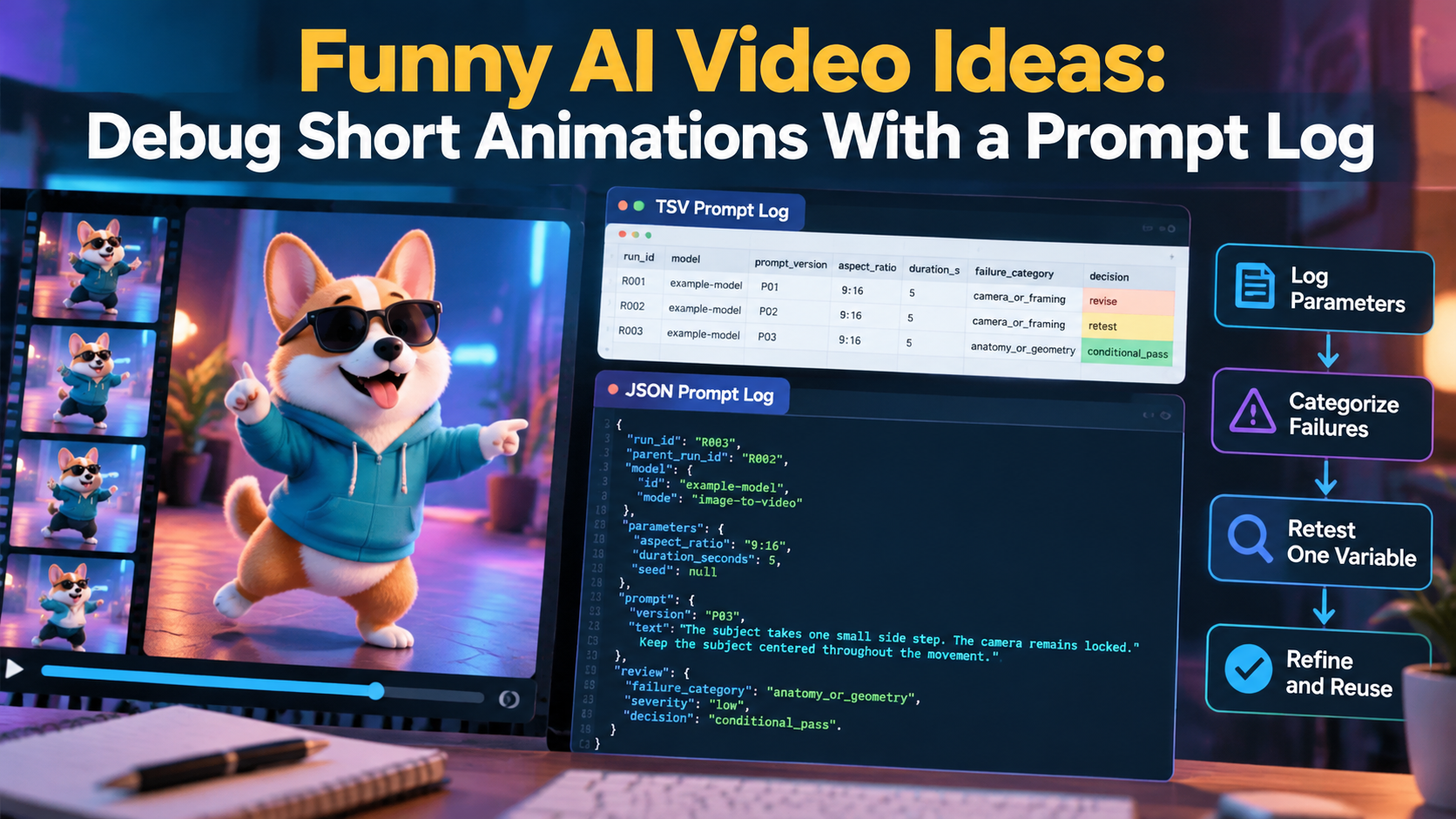
Tab-separated values (TSV) are useful when you want to inspect many generations in a spreadsheet. Each row represents one run, and columns capture the settings, prompt revision, observed failure, and review decision.
The following is a hypothetical example, not the result of actual model testing. The model identifier is illustrative, and the observations are included to demonstrate how a team might structure its records.
run_id	parent_run	model	mode	source_asset	aspect_ratio	duration_s	seed	prompt_version	prompt_text	failure_category	observation	decision
R001	-	example-model	image-to-video	dancer_ref_v1	9:16	5		P01	Two side steps; camera tracks right	camera_or_framing	Camera drifts toward the edge during movement	revise
R002	R001	example-model	image-to-video	dancer_ref_v1	9:16	5		P02	Two side steps; locked camera	camera_or_framing	Camera is steadier, but hand shape still changes	retest
R003	R002	example-model	image-to-video	dancer_ref_v1	9:16	5		P03	One side step; locked camera	anatomy_or_geometry	Hand appears consistent in this illustrative review	conditional_pass
The sequence isolates the changes. R002 changes the camera instruction while retaining the source image and requested movement. R003 keeps the camera instruction and simplifies the dance.
The illustrative observations suggest that the simpler movement might help with the hand defect, but these rows cannot establish causation or a general rule. A real evaluation would require inspecting actual outputs and, where appropriate, repeating the comparison.
Notice that prompt_text contains a concise description here. In production, store the complete prompt exactly as submitted, including any additional instructions. The prompt_version identifies the revision, while run_id identifies an individual generation. If the tool exposes a seed, record it; a blank field should not be mistaken for a known seed value.
Store the Same Record as JSON
TSV is convenient for visual inspection. JSON is useful when scripts, APIs, or internal tools need named fields and nested data. Both formats can coexist if they share a stable run ID and consistent field definitions.
Here is an illustrative JSON record corresponding to R003:
{
  "run_id": "R003",
  "parent_run_id": "R002",
  "experiment": "dance_motion_debug",
  "model": {
    "id": "example-model",
    "version": null,
    "mode": "image-to-video"
  },
  "input": {
    "asset_id": "dancer_ref_v1",
    "asset_checksum": null
  },
  "parameters": {
    "aspect_ratio": "9:16",
    "duration_seconds": 5,
    "seed": null
  },
  "prompt": {
    "version": "P03",
    "text": "The subject takes one small side step. The camera remains locked. Keep the subject centered throughout the movement.",
    "change_from_parent": "Reduced the action from two side steps to one."
  },
  "review": {
    "failure_category": "anatomy_or_geometry",
    "severity": "low",
    "observation": "Hand appears consistent in this illustrative review.",
    "decision": "conditional_pass",
    "limitations": "Hypothetical example; not a verified generation."
  }
}
The values are illustrative. In a real pipeline, the prompt must match the submitted text, and recorded parameters must match the actual generation request. A production schema should validate required fields, constrain failure categories to an agreed vocabulary, and preserve the output asset ID.
The parent_run_id field creates a traceable experiment history. A reviewer can move from a candidate clip to the previous version, inspect what changed, and understand why the new generation was requested.
Retest One Variable at a Time
Once a failure is classified, write a hypothesis before modifying the prompt. The hypothesis should connect one suspected cause to an observable defect.
For example: “The two-step movement may be too complex for this reference image, contributing to hand deformation during the transition.” The next test simplifies the movement while keeping the source image, camera instruction, aspect ratio, and other available settings fixed.
Start with the smallest change that could address the failure. If the camera drifts, test a clearer camera instruction. If the hand deforms during a complex dance, reduce the movement's complexity. If a product changes shape, inspect the reference image and reconsider whether the requested movement exposes details that the source does not establish.
Runway's official Text-to-Video Prompting Guide distinguishes visual descriptions from motion descriptions, including subject action, camera motion, direction, speed, and timing. Keeping these elements conceptually separate makes it easier to define focused experiments, even when the specific tool differs.
Avoid changing the source image and prompt simultaneously when trying to identify a cause. If both change, you cannot confidently attribute the result to either modification. If the source image is clearly defective, fix it in a separate experiment branch and document that decision.
Single-variable retesting does not mean every future generation must change only one setting. It means each diagnostic comparison should have a clear purpose. Once individual improvements are understood, combine them and review the complete creative direction again.
Turn Successful Debugging Into a Reusable Prompt Library
A useful prompt library stores more than attractive prompt text. Each entry should identify the intended use, compatible generation mode, source-image requirements, reviewed output, known limitations, and relevant failure history.
For example, a reusable comedy-animation entry might specify a character reaction with one simple movement and a locked camera. A more expressive variation could explore additional movement without overwriting the simpler version. The team can then compare the two approaches instead of losing the original when an experiment goes wrong.
Comedy and product advertisements may also require different acceptance criteria. An exaggerated transformation might work for a fictional character, while a product demonstration must preserve recognizable shapes, markings, and components. A dancing animation can be visually engaging yet unsuitable for an advertisement if the product changes appearance.
Treat prompts as model-specific until they have been reviewed in the intended environment. A prompt that works with one generator, version, or source image may behave differently elsewhere. Record that limitation rather than labeling a prompt universally reliable.
Before publication, check the source asset's permissions, the intended use of the generated clip, and any product claims appearing in the visuals or captions. Technical consistency alone does not establish that an animation is suitable for release.
When Should You Stop Retesting?
A debugging workflow needs a stopping rule. Otherwise, a team can spend its time producing increasingly elaborate variations without getting closer to a usable clip.
Stop when the output meets the project's acceptance criteria, or when repeated controlled attempts fail to improve the target defect. Consider changing the reference image, simplifying the creative direction, trying another generation approach, or using conventional animation or live footage.
For a comedy clip, acceptance criteria might focus on readable timing, recognizable characters, and a clear punchline. For a product advertisement, the requirements may be stricter: the item must remain recognizable, the intended feature must be visible, and the animation must not imply an unverified capability.
A conditional pass should also have a precise meaning. It might permit internal concept review while prohibiting final publication. Recording that distinction prevents a promising draft from being mistaken for an approved asset.
FAQ
What is the difference between a prompt log and a prompt library?
A prompt log records individual generation attempts, including settings, observed failures, and revisions. A prompt library organizes reusable prompts that have been reviewed for a defined purpose. The log preserves the history; the library provides curated starting points.
Should every generation have a unique prompt version?
Every distinct prompt revision should have an identifiable version or content hash. Multiple generations can share a prompt version when the text is unchanged, while separate run IDs distinguish their individual outputs.
What if the video model does not expose its seed?
Record the seed as unavailable rather than inventing a value. Preserve the prompt, source asset, model identifier, and other accessible settings. Even when a seed is available, exact reproduction may not be guaranteed across model versions or generation environments.
Can a prompt log guarantee reproducible video generation?
No. A log improves traceability and helps recreate experimental conditions, but model updates, nondeterministic behavior, and unavailable parameters can prevent exact reproduction.
Make Every Generation Explainable
Funny AI video ideas become easier to develop when a failed animation produces useful information instead of another round of guesswork. Record the generation, describe the defect precisely, form a testable hypothesis, and change one variable at a time.
Over time, TSV or JSON logs paired with a curated prompt library give a team a practical record of what it tried, what it observed, and what it can responsibly reuse. The goal is not to eliminate every imperfect render. It is to make each revision more deliberate, each decision easier to review, and each approved animation more dependable for its intended use.
About the author
- I'm a digital content enthusiast passionate about technology, innovation, and emerging digital trends. I enjoy exploring new ideas, sharing practical insights, and creating informative content that helps readers learn and stay updated in an ever-evolving digital world.
Comments
Join the discussionNo comments yet. Be the first to comment.